 Offset Budget Tracker
 For Australian households with an offset account
Is your offset actually working?
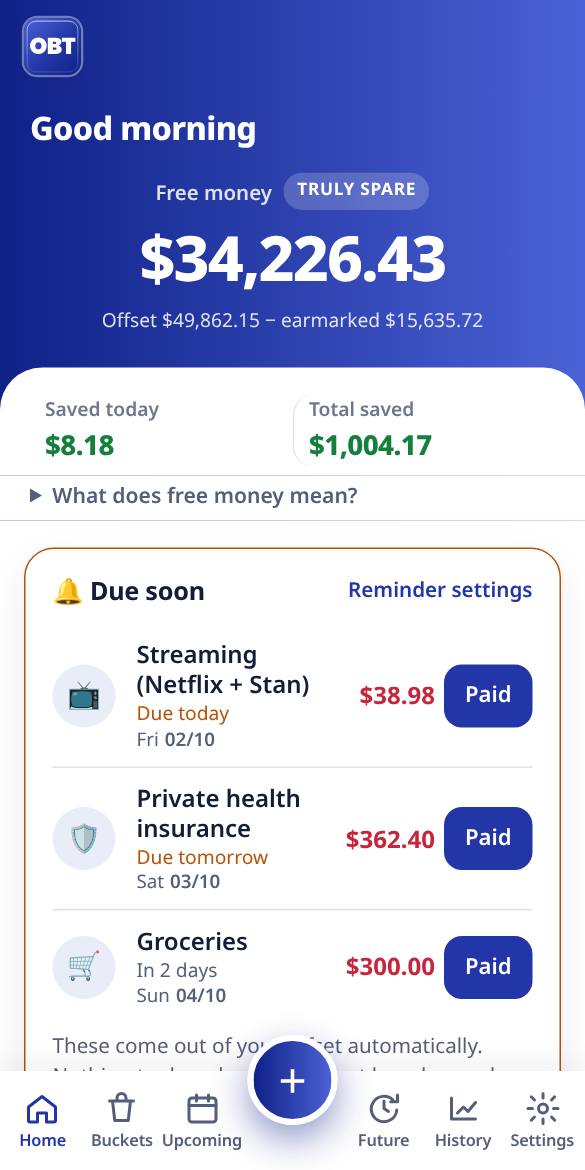
Offset Budget Tracker shows what every dollar in your offset is doing: what's set aside for bills, what's saved for the holiday, what's truly spare, how much interest it's saving you today, and how much sooner you could own your home.
Real life features for real life people.
- No ads
- No commissions
- We never sell loans or cards
- Made in Australia
One account. A dozen jobs.
An offset is brilliant: every dollar in it cuts the interest on your home loan. But it turns all your money into one big number.
Money sits in the wrong place
Rego, insurance, Christmas, the car service, the emergency fund and next week's groceries all live in the same balance. It's hard to know what's actually spare, so money ends up in separate savings accounts that don't offset anything.
The spreadsheet always breaks
It works until pay changes, the rate goes up, there's a bonus or overtime, or someone forgets to update it. And most budgeting apps simply don't understand offset accounts.
Banks get offsets wrong too
Some offset accounts were never linked to the loan at all, so they saved nothing. Customers often had no way to tell.
paid back to customers by banks for offset accounts that weren't set up or linked properly, according to the corporate regulator ASIC's July 2026 review of eight banks.
ASIC's tip: check that your offset is actually getting the benefit of saving interest. Offset Budget Tracker shows you what it should be saving, so you can compare it with your statement.
Sources: ASIC media release 26-173MR and ASIC Report 837 (29 July 2026).
What it does
Built by an Australian family to run their own household. Everything here works in the app today.
Buckets inside one offset
Split one offset balance into bills, savings goals and "truly spare", without opening extra accounts. Every dollar keeps cutting your interest.
Interest saved, every day
See what your offset saved you today, this month and over the next 12 months, worked out from your own balance and rate.
Payoff date, with vs without
When you'll own your home with your offset compared with without it, plus "what if" sliders for extra repayments and rate changes.
Two-person sync
Share one household with your partner. You both see the same numbers, live, on your own phones. (Household Pro)
Bill and pay reminders
A calendar of what's coming out and when, with reminders before bills are due. Tick them off as they're paid.
Overtime, bonuses and side hustles
Irregular income doesn't break it. Log overtime, a bonus or side-hustle money and decide where it goes.
Emergency fund
Set a target in months of essential spending or a dollar amount, and watch progress without moving money out of your offset.
Rate changes, planned ahead
Lender emailed a new rate from next month? Add it with its date and the forecast switches over on the day.
Monthly report
Where the money went by spending category, what came in, and how much interest your offset saved that month.
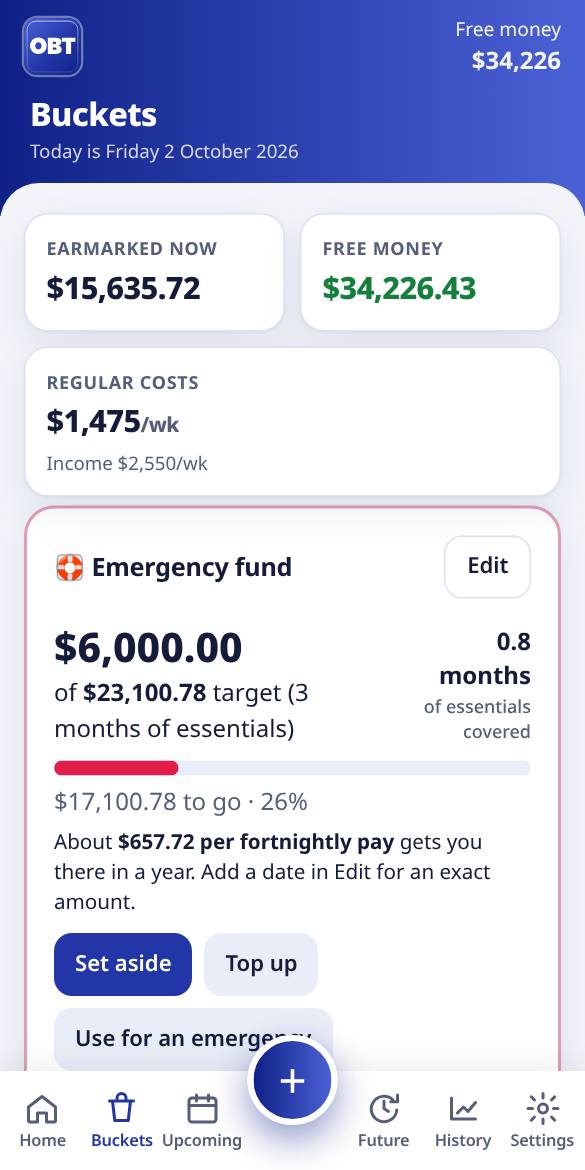
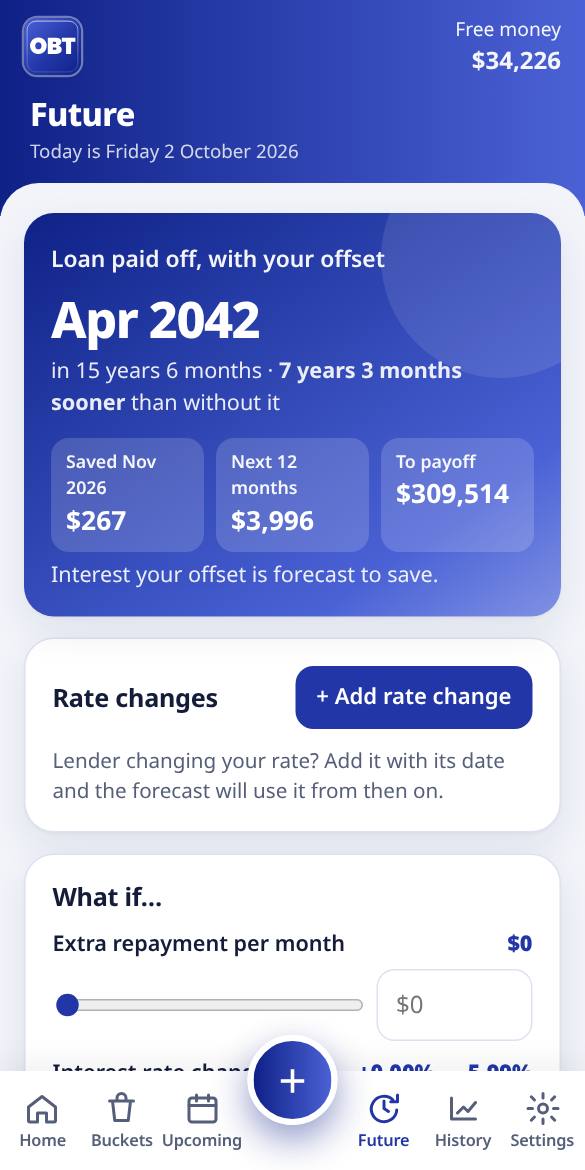
Screenshots use made-up example figures.
Facts, not sales.
"Real life features for real life people. We don't sell other products or loans, we just help with facts."
Lots of "free" money apps make their money by steering you towards a new loan, card or account. We don't.
- We never sell loans, credit cards or other financial products
- No ads, ever
- No commissions or referral fees from banks, lenders or brokers
- We don't sell or share your data with marketers
- Paid for by a simple, optional subscription. That's the whole business model
- Independent. Not affiliated with any bank or lender
How much is your offset saving you?
A quick, free estimate. Type in your own numbers; nothing you enter here leaves your device.
If your offset isn't actually linked to your loan, this is roughly what you'd be missing out on. Check the interest charged on your statement.
General information only. This calculator gives an estimate based on the figures you enter and the simplified assumptions above. It doesn't take into account your objectives, financial situation or needs, and it isn't financial or credit advice or a recommendation about any product.
The results are not intended to be relied on for making decisions. Your lender's calculation of interest is the one that counts. Before acting, consider getting advice from a licensed financial adviser or credit professional, and check with your lender.
Offset Budget Tracker isn't affiliated with any bank or lender and doesn't promote any financial product.
Simple pricing
Free for getting your offset organised. One subscription for the whole household if you want the extras. No ads in either.
Free
For getting your offset organised.
- Use it on your phone, or with a free account (backed up, on all your devices)
- One home loan and offset, with buckets inside it
- Up to 5 bills and 3 savings goals
- Interest saved today and in total, and your true "free money"
- Upcoming bills list
- Overtime, bonus and side-hustle logging
- House value, home equity and one super fund
- Emergency fund tracker and backups
- "Is my offset working?" statement check
Household Pro 14-day free trial
or A$39.99 a year (about A$3.33 a month). One subscription covers your whole household.
- Everything in Free
- Share with your partner: live household sync
- Payoff date with vs without your offset, plus what-ifs
- Scheduled rate changes
- Bill reminders and calendar export
- Monthly reports and spending breakdown
- Unlimited bills, savings goals and super funds
Investment Pro 14-day free trial
or A$79.99 a year (about A$6.67 a month). For households with investment properties.
- Everything in Household Pro
- Investment properties, each with its own loan and offsets
- Property bills kept separate from your household budget
- Rent and other income, and cash flow per property
- Payoff forecast per property, with vs without its offsets
- What happens after a property is paid off, in your Future forecast
Prices are in Australian dollars. You'll always see the final price before you're asked to pay anything.
Cancel any time in Settings → Plan → Manage subscription. You keep Pro until the end of the period you've paid for. We don't give partial refunds except where the Australian Consumer Law requires it. Full detail in the terms.
Questions
How can I tell if my offset is actually working?
Start with your loan statement or banking app. Your offset account should be listed as linked to the home loan, and the interest charged each month should be lower than it would be on the full loan balance. A rough check: loan balance minus offset balance, times your rate, divided by 365, should be close to your daily interest.
If the numbers don't line up, ask your lender to confirm in writing that the offset is linked and from what date. Offset Budget Tracker shows you what your offset should be saving so you have something to compare against. (The app has an "Is my offset working?" check under Interest / Settings.)
Is this financial advice?
No. Offset Budget Tracker is a budgeting and calculation tool. It works with the numbers you put in and shows general information. It doesn't recommend any loan, account or product, and it doesn't consider your personal objectives, financial situation or needs. For advice, talk to a licensed financial adviser or credit professional.
Do I have to connect my bank or share my bank login?
No. You type in your balances and bills yourself, which takes a few minutes to set up. There's no bank login, no screen scraping and no access to your accounts. You stay in control of exactly what goes in.
Where is my data kept? Who can see it?
If you use it without an account, your budget stays on your device. If you create an account (free) or share with your partner, it's stored in Google Firebase in Google's Sydney data centre region, and only you and the people you invite to your household can see it. We don't sell data, show ads or use tracking cookies. See the privacy policy.
Can my partner and I both use it?
Yes. Sharing is part of Household Pro: you both sign in on your own phones and see the same buckets, bills and balances, updated live. Sign in with a Google account or with any email address and a password.
What devices does it work on?
It runs in the web browser on iPhone, Android and computers, and you can add it to your home screen so it opens like an app. Store apps may come later.
What if I have more than one loan or offset?
Your budget is built around one home loan and its offset account, with buckets inside it. With Investment Pro you can add investment properties too, each with its own loan, offset accounts, bills and rent. Need something else, like redraw? Email us at support@offsettrackerapp.com. It helps us decide what to build next.
How do you make money?
Only from the optional Household Pro and Investment Pro subscriptions. No ads, no commissions, no referral fees and no selling your data. That's what lets us stick to facts.
Can I use it now?
Yes. The Free plan, Household Pro and Investment Pro are all available now. Both Pro plans start with a 14-day free trial, and you can cancel before it ends without being charged. Open the app.
Start free
Set up your offset, bills and buckets in a few minutes. No bank login, no card needed.
Contact
Questions about the app or your household? Email us.
For support, billing, privacy or feedback.